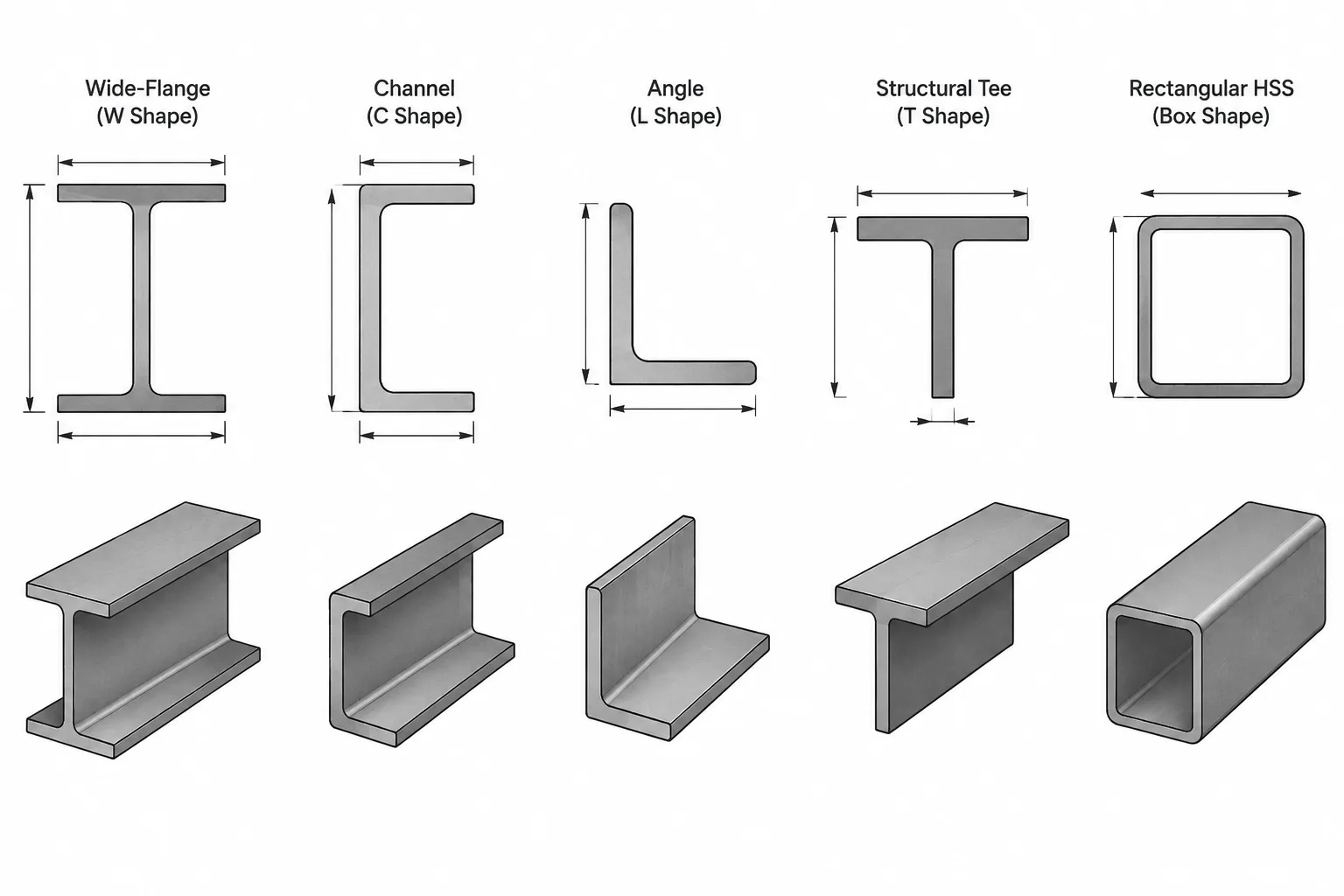
A structural steel shape designation is an identification label, not a complete geometric definition. It helps users select, schedule, and communicate a section, but it does not replace the dimensional data needed for modeling, connection layout, clearance checks, or fabrication drawings.
This distinction is especially important when a designation contains familiar-looking dimensions. A nominal depth, leg size, outside dimension, or wall thickness may appear suitable for direct use in CAD. Depending on the shape family, however, the name may include an approximate dimension, a nominal dimension, a weight per unit length, or a reference to a parent section. The profile must still be built or verified from the applicable shape data.
Designation data and geometry serve different purposes
A designation primarily answers, “Which section is this?” A dimension table answers, “What geometry is associated with that section?” Those are related questions, but they are not interchangeable.
Shape data commonly includes overall depth, flange width, web thickness, flange thickness, leg dimensions, wall thickness, corner or fillet information, and dimensional references used for detailing. Property tables may also provide area, weight per unit length, centroid locations, moments of inertia, section moduli, radii of gyration, and torsional properties.
For reliable work, separate the available information into three groups:
- Identification: shape family and designation.
- Tabulated geometry: published dimensions used to define or represent the section.
- As-produced geometry: the physical member, including permitted manufacturing variation and local profile characteristics.
A CAD profile based on tabulated geometry is a reference representation. It should not be treated as a scan of every piece that may arrive from the mill.
How common steel shape names should be read
| Shape family | What the designation generally communicates | What must still be checked |
|---|---|---|
| W, S, and HP shapes | Shape family, nominal depth category, and weight per unit length | Actual tabulated depth, flange width, web and flange thicknesses, fillet zones, and section properties |
| Channels | Channel family, nominal depth category, and weight per unit length | Tabulated depth, flange width, web thickness, flange thickness or slope-related geometry, and centroid offset |
| Angles | Leg sizes and nominal thickness | Root radius, toe profile, centroid location, principal-axis orientation, and actual fit at connected surfaces |
| Structural tees | Tee family, nominal size, and weight per unit length | Tabulated tee depth, flange width, stem thickness, flange thickness, and relationship to the parent shape when relevant |
| Rectangular and square HSS | Nominal outside dimensions and nominal wall thickness | Design wall thickness where required for calculations, corner geometry, flat widths, inside clearance, and production tolerances |
| Round HSS | Nominal outside diameter and nominal wall thickness | Applicable tabulated wall information, inside clearance, and permitted variation |
The exact interpretation should always follow the source associated with the project and product. The table above is a workflow guide, not a substitute for current reference data or procurement documentation.
Why a W-shape name is not its measured depth
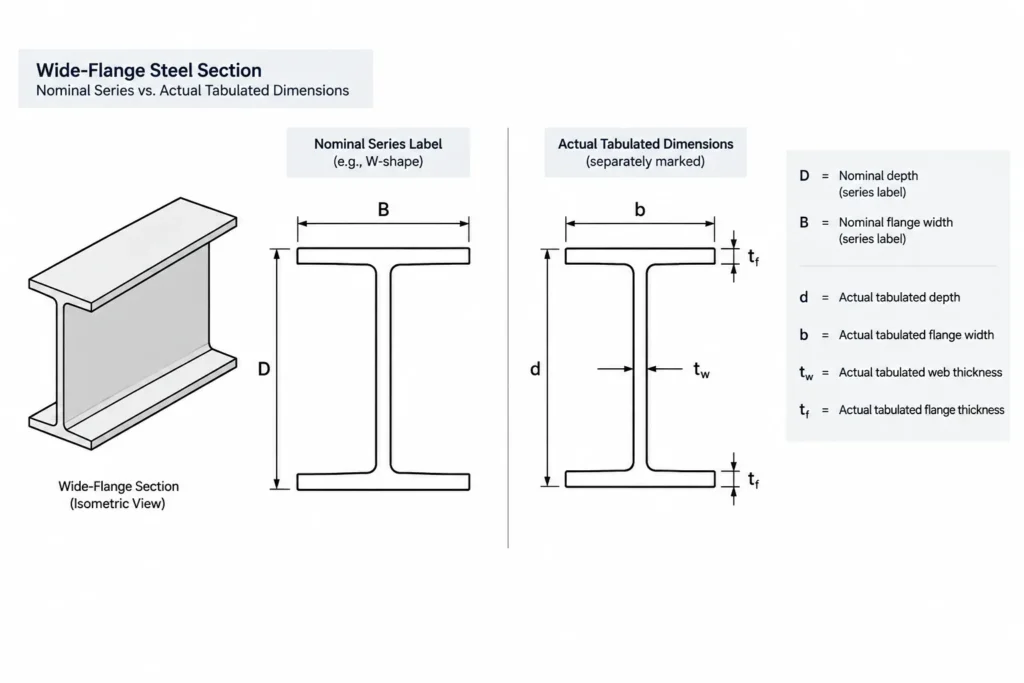
For a W-shape, the depth portion of the designation identifies a nominal series rather than guaranteeing an exact overall depth. Multiple sections in the same series can have different tabulated depths because flange and web proportions change as the section becomes heavier or lighter.
This matters when beams of different weights frame into the same area. If a modeler places every section using an assumed series depth, top-of-steel or bottom-of-steel elevations can shift when the true tabulated depths are applied. Connection plates, beam end cuts, slab edges, deck support, fireproofing limits, and adjacent architectural elements may also be affected.
The second designation component for a W-shape expresses weight per unit length; it is not a flange width or thickness. Flange width must be obtained independently from the dimensional data. Likewise, web and flange thicknesses cannot be inferred reliably from the weight label.
Channels require both dimensions and orientation
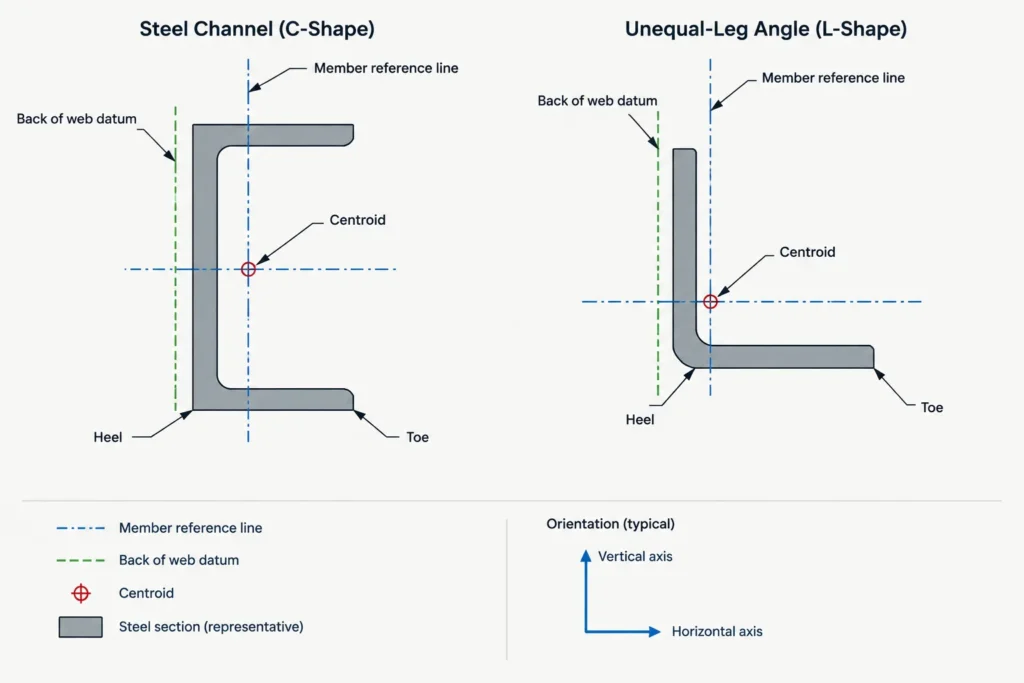
A channel designation does not fully describe where the member centerline lies relative to the back of the web. Because the section is monosymmetric, its centroid is offset toward the flanges rather than being centered within the overall bounding rectangle.
For CAD placement, decide whether the controlling datum is the member centroid, the back of web, the open side, a supporting face, or a connection work line. Then use the tabulated geometry and centroid information consistently. Simply drawing a rectangle to the nominal depth and flange width can misplace both the steel and its analytical line.
Channel flange geometry also depends on the channel family. A simplified profile may be appropriate for a small-scale plan, while a connection or clearance study may require a more faithful representation of flange surfaces, toes, and fillet regions.
Angle labels are simple, but angle geometry is not
An angle designation communicates its two leg sizes and nominal thickness. That is enough to identify the section, but not enough to locate its centroid or principal axes. An angle is unsymmetric about its centroidal axes, and an unequal-leg angle also requires careful orientation control.
In drawings and models, verify which leg is vertical, which leg is connected, and whether the heel or toe is the layout datum. A rectangular-leg sketch that omits the root radius may be acceptable for general representation, but it can be misleading when laying out bolts, fitting another plate near the heel, or checking a tight cope.
Do not derive section properties from the designation alone. Use verified table values or calculate properties from a suitably accurate profile using a documented method.
Structural tees retain a relationship to a parent shape
Rolled structural tees are commonly associated with splitting a rolled I-shaped parent section. Their names identify the tee series, but the tee depth should not be created by blindly dividing a nominal parent depth. The actual cut location, material removed by the cutting process, and tabulated tee geometry all matter.
For drafting, use the tee’s listed dimensions rather than reconstructing it from a nominal label. If fabrication involves splitting a parent section, coordinate the intended parent shape, cut method, straightening needs, and final dimensional requirements with the responsible project parties.
HSS dimensions require a nominal-versus-physical distinction
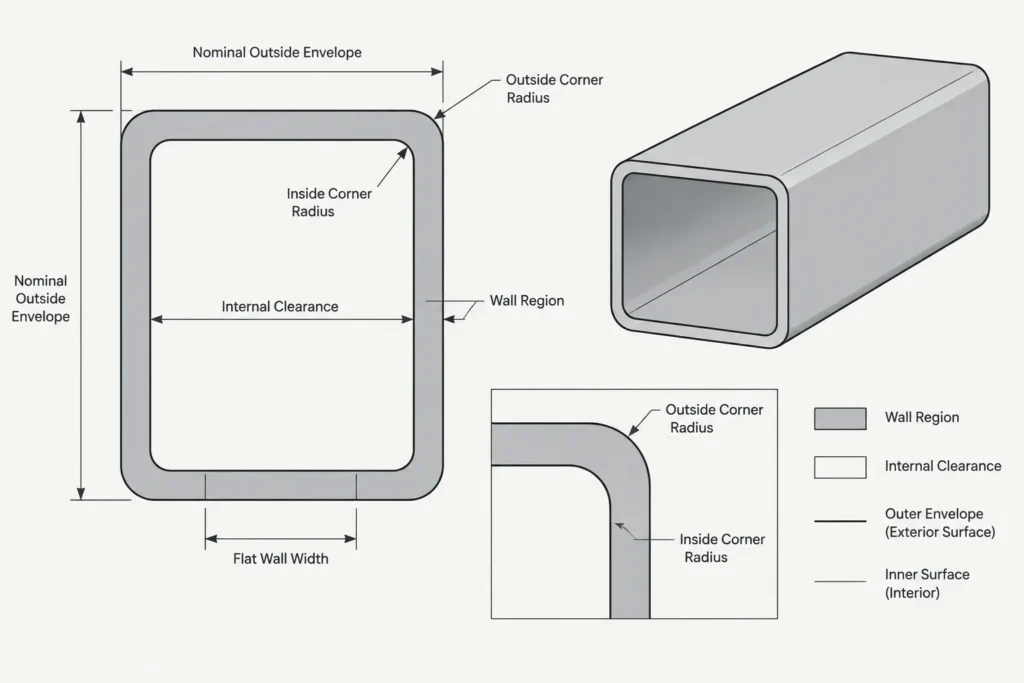
Square and rectangular HSS designations look especially geometric because they state outside dimensions and a wall thickness. Even so, the designation does not capture the complete profile. Rounded corners affect the outside contour, inside opening, flat wall widths, area, and fit of inserted parts.
The nominal wall thickness in the name may also differ from the thickness basis used for certain design calculations. Keep the designation, tabulated design data, purchasing information, and CAD geometry clearly distinguished rather than using one value for every purpose.
For a connection to an HSS face, the nominal outside dimension may be an appropriate layout basis when supported by the project documents. For an insert, through-plate, internal diaphragm, or close-fitting cap, the available inside space and corner geometry require separate investigation. A nominal outside envelope cannot establish internal fit by itself.
A practical CAD and detailing workflow
1. Preserve the full designation
Store the complete shape name in the member record, schedule, block attribute, or object property. Avoid abbreviated labels that omit the shape family or weight component.
2. Obtain geometry from a controlled source
Use a verified shape database, project reference, manufacturer information where applicable, or another source accepted for the work. Do not estimate missing dimensions from the designation.
3. Define the insertion datum
Record whether the profile is inserted at its centroid, geometric center, back of web, outside face, top of steel, heel, or another project datum. This prevents a correct profile from being placed incorrectly.
4. Match profile detail to the task
A schematic model may use simplified corners and fillets. Connection fitting, CNC preparation, and close-clearance studies may require more detailed geometry. Label simplified profiles so that users do not mistake them for fabrication-ready contours.
5. Check section properties independently
Geometry and properties should agree, but each deserves verification. Confirm axis orientation, units, and whether the values apply to the intended shape rather than a nearby designation.
6. Recheck after substitutions
A proposed section with a similar nominal depth can still have a different actual depth, flange width, thickness, centroid location, or corner geometry. Recheck elevations, connections, clearances, weight, and analytical properties whenever the designation changes.
The key rule
Use the shape designation to identify the member; use verified dimensional data to draw and detail it; and use applicable property data for analysis and design. Keeping those roles separate prevents nominal labels from becoming unintended controlling dimensions and makes steel models, drawings, and schedules easier to coordinate.


