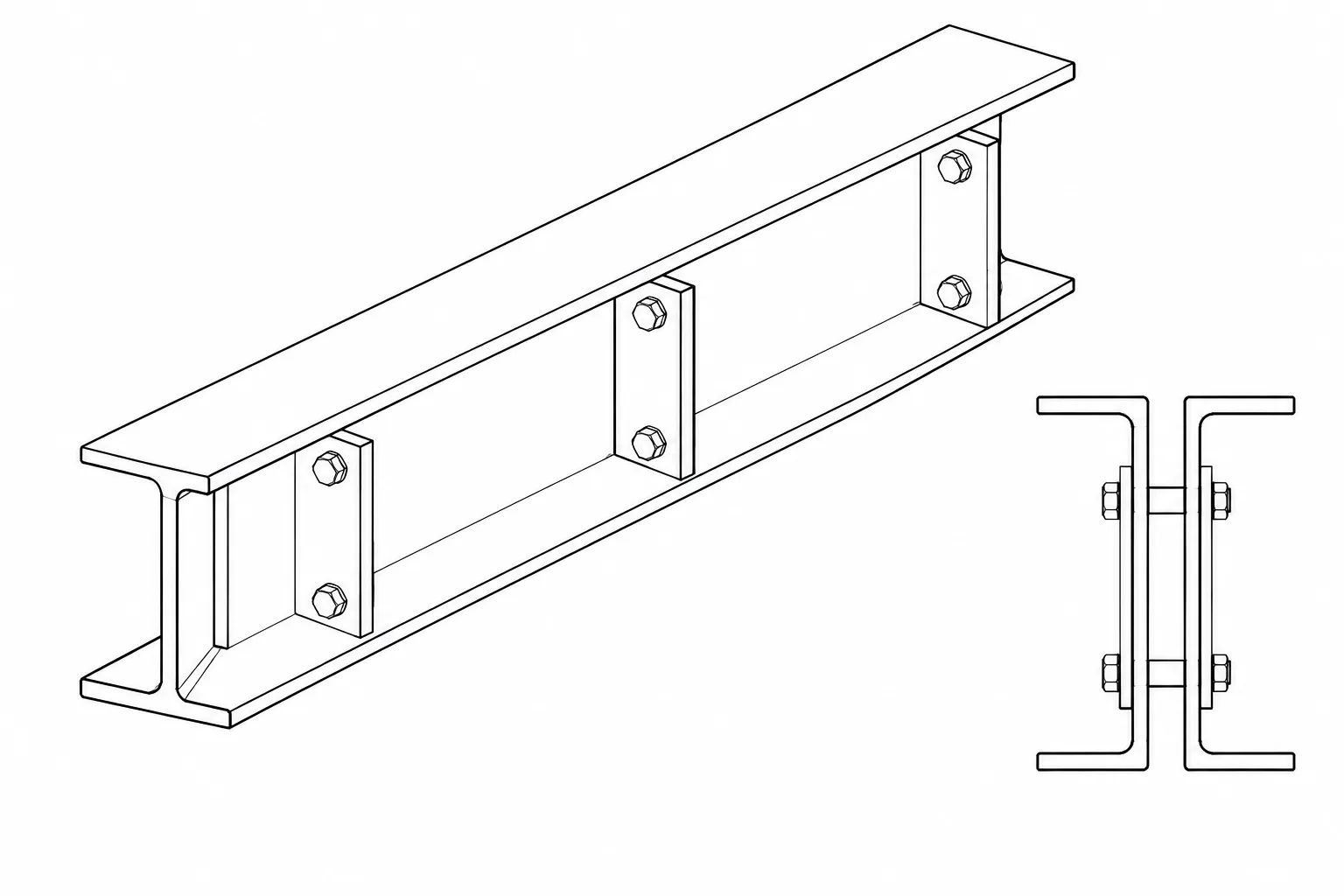
Back-to-back steel channels are commonly used where a single channel would be inconvenient because of its unsymmetrical cross section, limited connection space, or tendency to twist under eccentric loading. Pairing two channels can create a member that is symmetric about a central plane and provides accessible surfaces for gusset plates, battens, splice plates, or other connection components.
The phrase back-to-back, however, does not define the entire assembly. The drawings must also establish whether the channel webs touch, whether a clear gap is maintained, how the channels are connected, and which line controls member placement. These decisions affect section properties, connection eccentricity, fabrication, and the reliability of the CAD model.
What Back-to-Back Channel Orientation Means
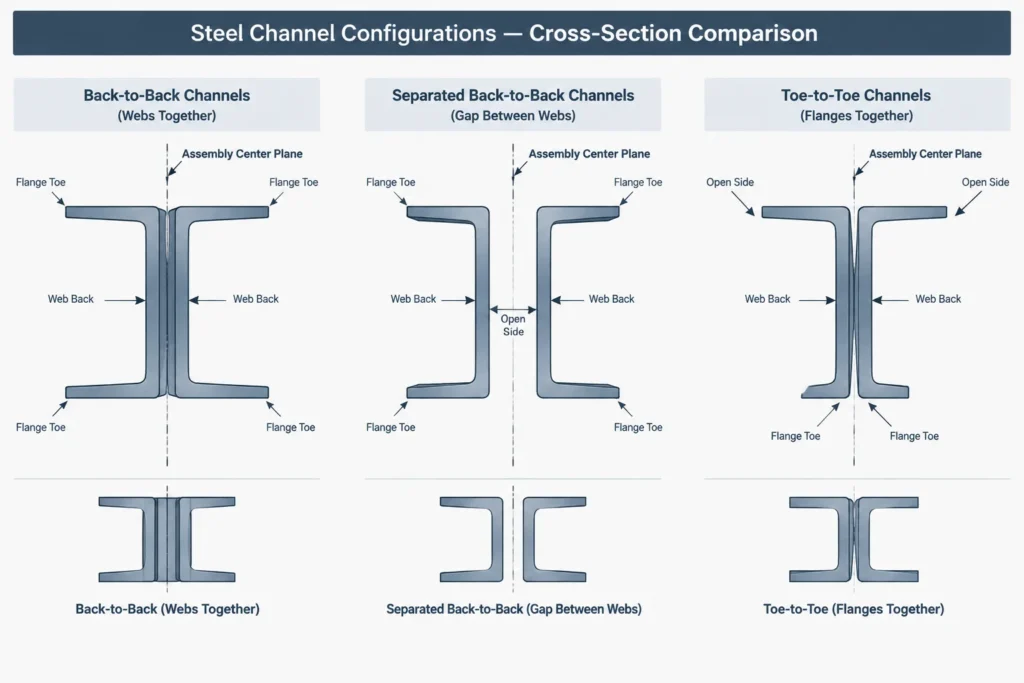
A channel has a web back, an open side, two flange toes, and a centroid that does not normally lie on the web centerline. In a typical back-to-back arrangement, the web backs face toward the center of the built-up member and the flanges project outward. The channels may be in direct contact or separated by plates, washers, gussets, or a specified clear space.
This differs from a toe-to-toe arrangement, in which the open sides face inward and the webs are located toward the outside. Terminology can be interpreted inconsistently across offices and software, so orientation should not be communicated by a text note alone. A section view or unambiguous shape symbol should show the web backs, flange directions, and spacing.
| Arrangement | Typical visual condition | Key detailing question |
|---|---|---|
| Web backs in contact | Channels meet at the backs of their webs | Can the webs be held together consistently, and how are they connected? |
| Web backs separated | A clear space exists between the webs | What establishes and maintains the spacing? |
| Plate or gusset between webs | An intermediate component occupies part of the gap | Is the plate continuous, local, or limited to connection regions? |
| Toe-to-toe pair | Channel openings face toward the member center | Is there adequate access to the enclosed region? |
The Centerline Is Not the Web Back
One of the most important geometric facts is that the centroid of an individual channel is offset from the back of its web. For two identical, mirrored channels, the centroid of the complete pair lies on the assembly symmetry plane. It does not necessarily lie on either web surface or halfway through one channel web.
If the web backs touch, the assembly center plane is usually the contact plane. If the channels are separated by a uniform clear gap, the assembly center plane is normally halfway between the web backs. The centroid of each individual channel remains offset from its own web datum, so the distance from each channel centroid to the assembly center plane includes both the channel centroid offset and the applicable portion of the gap.
This distinction matters when calculating section properties, placing analysis elements, or aligning a built-up member with a structural grid. A CAD block inserted by the web back will move differently from one inserted at the pair centroid. The chosen insertion point should therefore be identified rather than assumed.
How Spacing Changes Built-Up Section Properties
For two identical channels placed at the same elevation and mirrored about a vertical center plane, the gross area of the channel pair is twice the area of one channel. The nominal channel weight is similarly doubled before accounting for connector plates, battens, weld metal, fasteners, or other added material.
The moment of inertia about the horizontal centroidal axis can often be assembled by adding the corresponding property of each channel when there is no vertical offset. The property about the vertical symmetry axis requires a parallel-axis contribution because each channel centroid is displaced from the center of the pair.
Using A for the area of one channel, Iy for its centroidal property about the parallel local axis, and d for the horizontal distance from the channel centroid to the pair center plane, the geometric combination takes the form:
Iy,pair = 2(Iy,channel + Ad2)
The equation shows why the gap cannot be omitted from a section-property model. Increasing the channel separation increases d, which can substantially change the pair property about the center plane. It also changes the overall width, connection eccentricities, and the geometry of intermediate plates.
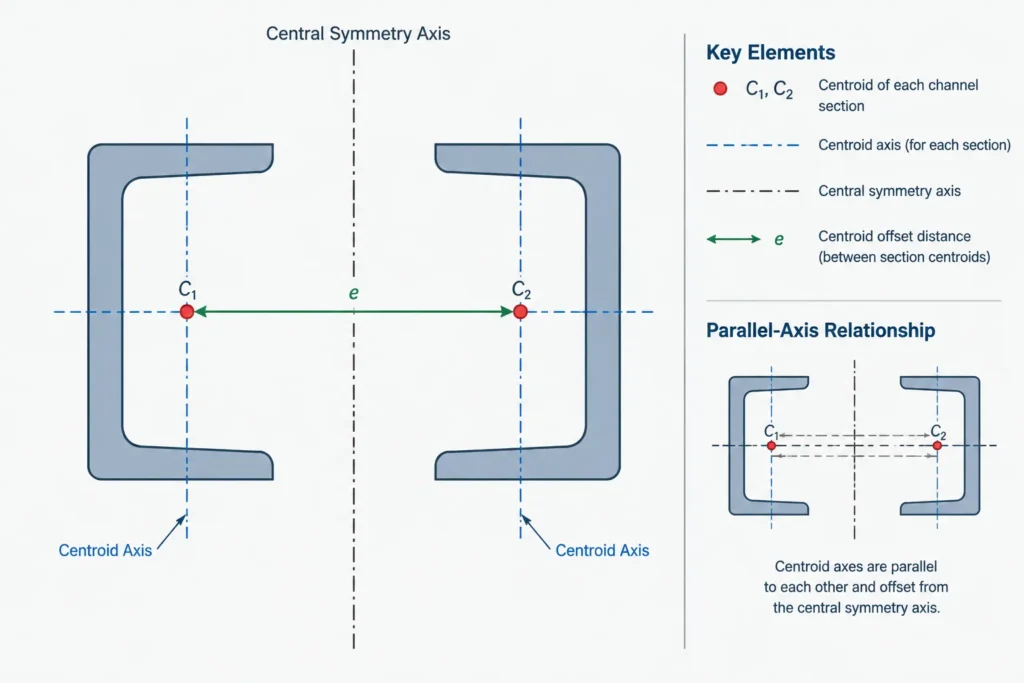
Simple addition is not enough for every property. Torsional and warping behavior can depend on how the channels are tied together, the spacing and stiffness of connectors, and whether relative movement between components is restrained. A geometric CAD union also does not prove that two physically separate channels act as a fully composite section. The structural model and connection assumptions must be established by the responsible engineer.
Common Ways to Define Channel Spacing
The controlling spacing datum should be stated directly. Useful options include:
- Clear distance between web backs: Directly defines the physical opening and is useful where a plate or gusset must fit between the channels.
- Back-to-back dimension: May describe either contact or separation, but the exact surfaces referenced must be visually clear.
- Channel centroid spacing: Useful for section-property calculations, but usually less convenient for shop layout.
- Overall outside width: Helpful for clash checks and envelopes, although it may be a derived rather than controlling dimension.
- Spacing plate thickness: Can control the gap where the channels bear against a plate, provided coatings, fit, and fabrication intent are coordinated.
Avoid controlling the same spacing with several independent dimensions. For example, simultaneously specifying a clear web gap, centroid spacing, and overall width can create conflicts if the selected channel size changes. Choose one fabrication-friendly controlling dimension and mark the others as reference information when they are needed.
Connector Plates, Battens, and Local Attachments
The two channels need a defined means of acting as an assembly. Depending on the design, this may involve end plates, intermediate batten plates, lacing, through-bolts, welded spacers, gusset plates, or combinations of these elements. Their arrangement affects more than member identification.
- Intermediate components may maintain spacing during fabrication and erection.
- Bolts through both webs require coordinated hole alignment and an understood ply stack.
- Welded details need access for placement, inspection, and cleaning.
- Local plates can interrupt otherwise open drainage or coating paths.
- End connections may introduce load into one channel before transferring it to the other.
- Closely spaced webs may restrict tool access or make hidden surfaces difficult to coat.
The connector size, spacing, welds, and fasteners are design decisions and should not be inferred from a generic CAD detail. The detailer should model and dimension the approved connection arrangement while checking whether it can actually be assembled.
CAD Modeling Workflow
A reliable model begins with one verified channel profile. Place it using a documented local origin, such as the web back at the section centerline or the published centroid. Create the second channel by mirroring it about the intended assembly center plane rather than drawing a visually similar copy.
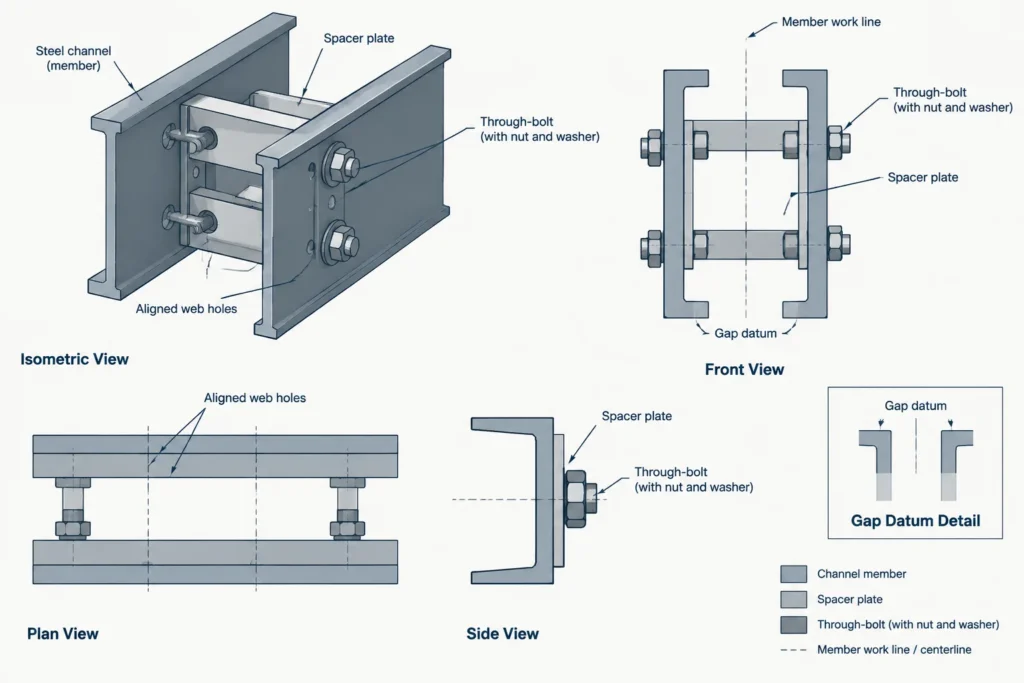
Then apply the controlling separation. If the channels are spaced by a gusset or batten, model the actual relationship between the component faces rather than moving the channels until the view merely looks correct.
Recommended model checks
- Confirm that the channel designations and orientations match the member callout.
- Verify that the pair is mirrored, not simply copied with the same facing direction.
- Measure the clear web gap and overall envelope independently.
- Check the pair centroid and member insertion line.
- Keep the channels as identifiable components even if a separate analytical profile is created.
- Include spacer and connection material in bills of material rather than hiding it inside the channel object.
- Review holes from both sides to catch mirrored or near-side/far-side errors.
If section properties are calculated from CAD regions, preserve a calculation copy of the geometry. Record whether the calculation includes only the channels or also includes continuous plates. Local battens and intermittent connectors generally should not be treated automatically as continuous cross-sectional material.
Drawing Information That Removes Ambiguity
A complete built-up channel detail should communicate the channel designation, quantity, orientation, member length basis, spacing datum, and connector arrangement. Section cuts are especially valuable because an elevation may show two channel lines without revealing which way the flanges project.
Where the pair frames into a gusset or plate, show whether the plate is centered between the channels, attached outside the pair, or offset to one side. Dimension holes from stable datums such as member work lines, plate edges, or web backs. Do not rely on a plotted gap to communicate a required fit.
Final Coordination Checklist
- Is back-to-back orientation visible in a section view?
- Are the channels touching, separated, or fitted around another plate?
- Is the controlling spacing dimension clearly identified?
- Does the analysis line correspond to the intended assembly centroid or work line?
- Were section properties calculated using the actual channel centroid offsets?
- Are torsional and built-up action assumptions supported by the designed connectors?
- Can bolts, welds, coatings, and inspection reach the spaces shown?
- Are all battens, spacers, plates, and fasteners represented in fabrication information?
Back-to-back steel channels are straightforward only when orientation, spacing, and load transfer are explicitly defined. Treating the pair as a coordinated built-up assembly—not merely two channel outlines—produces more reliable properties, clearer drawings, and fewer fabrication questions.